Continue Exploring QuickBite
Choose a chapter after the first order-and-payment investigation
New to the sample? Complete Follow an order first. This page helps you choose what to explore next.
Open Explore Archflow from the global sidebar. Expand a chapter and choose a stop. You can visit any chapter without completing the others.
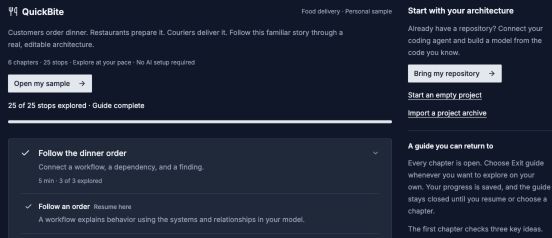
Return to the same editable sample whenever you want to investigate another question.
Open image separatelyChoose a question
| Question | Chapter | Look for |
|---|---|---|
| What makes up the system? | Build the model | Ordering and its Order API, relationship contracts, data ownership, behavior, and deployments |
| Which dependencies deserve attention? | Investigate the architecture | Explorer, Context Map, Complexity, and Coupling |
| How can I review a change? | Explore and review change | Decisions, versions, checkpoints, and simulations |
| How do I explain this to my team? | Explain and share | Handbook entries, Views, documentation, and source evidence |
| How do I use my own architecture? | Make it yours | Optional Archie setup, a coding-agent connection, and project creation |
Use the guide
- All chapters returns to the chapter list.
- Jump to a tour stop goes directly to another question.
- Collapse the instructions when you need more space for a diagram.
- Exit guide closes the guide. Resume it from Explore Archflow.
The opening chapter asks three comprehension questions. Later stops use Mark explored & continue. Marking a stop records progress; it does not verify an external setup or assert that you changed the model.
The guide uses its sample version. If a step is unavailable, open the guide's evidence link and wait for that page to load. Troubleshooting explains the common blockers.
Experiment at your own pace
QuickBite is editable. Its automatic AI work is turned off, so an empty Documentation → Decisions inbox is expected. The core investigation works without AI credentials.
For your own work, create a small project, connect a coding agent, or import an archive. These options remain available without completing the tour.
In-app Archie uses the provider configured in Settings → Archie and AI for hosted accounts. In self-hosted organizations, an administrator configures organization AI. Installing coding-agent skills and connecting MCP are separate steps.