Start from a Repository
Connect your coding agent and review a small architecture model grounded in code
Use your coding agent when a repository already contains the best evidence for the architecture. Start with one useful flow, review the proposed model, and add detail later.
You need: access to the repository, an Archflow account, and an agent that supports the supplied skills and MCP configuration. In-app Archie and your coding agent are separate setups.
1. Open the connection guide
Go to Settings → Developer tools, or choose Bring my repository from Explore Archflow. Choose the agent or destination you actually use.
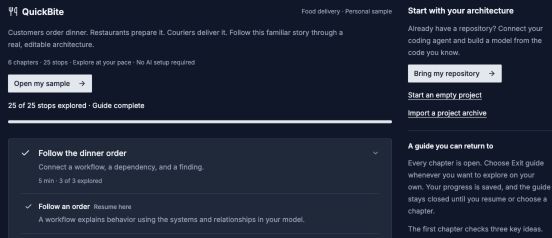
Bring my repository opens the coding-agent setup. You do not need to finish the sample tour first.
Open image separatelyFollow the generated configuration for the chosen account or project scope. Keep credentials in the agent's configuration, not in repository files or prompts.
2. Install the skills and verify MCP
Download the current skills bundle from the guide and install it for the selected agent. Complete the connection verification before asking it to build anything.
Skills provide the modeling workflow. MCP provides authenticated access to Archflow. Installing one does not establish the other. The MCP reference explains scopes and supported operations.
3. Ask for a small proposal
Open your repository in the coding agent and start with:
Use archflow-onboard to propose an initial architecture from this repository.
Start with the main systems and one important user flow. Show the code evidence
and any uncertain assumptions before expanding the model.
Confirm the intended destination project and version before accepting changes. Review system boundaries and names, relationship direction, and the evidence for workflow steps. An inferred dependency needs review even when it comes from real source files.
4. Inspect the result in Archflow
Open Model → Systems and Model → Relationships. Follow the chosen journey under Model → Workflows, then create a focused View for the question you want to discuss.
Your result: a model you can explain and connect back to repository evidence. A larger model is useful only if those boundaries and references remain understandable.
Continue with Build a C4 View, Map a workflow, or Share an architecture review.