Publishing And Sharing Documentation
Publish selected architecture evidence and control reader access
Publishing creates a versioned documentation experience from an Architecture View. Publication access and guest share links are separate controls.
Result: a reviewed publication with access appropriate for its readers. You need a saved View and permission to publish it. A View, its draft preview, and a published release are different states.
1. Prepare The View
Open Documentation → Views, select a View, and open its documentation area. Review generated and manually edited content, referenced Architecture Documents, images, and selected model evidence.
2. Configure The Publication
Open the View’s Publishing area, choose Prepare first release (or Prepare next release), and configure:
- Publication title and optional description
- Public or private visibility
- The sections appropriate for the audience
- A preset Preview Theme
- Expiration: never, one day, one week, one month, or a custom date
Available sections include Systems, Relationships, Data Model, Context Map, Capability Map, Behavior Model, Coupling, Complexity, Blast Radius, Workflows, Deployments, Architecture Handbook, and selected Architecture Documents. Empty or unavailable sections should not be included merely for completeness.
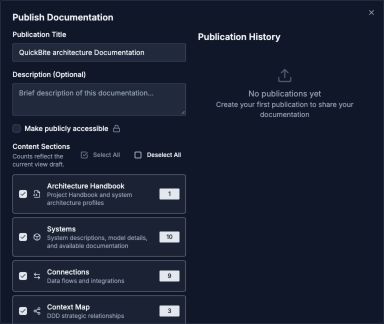
Choose the audience and content, review the saved release, then preview the draft before publishing.
Open image separatelyReview the release before publishing
- Read Review this release. The first release summarizes the selected saved content; later releases compare it with the previous publication.
- Inspect additions, changes, and removals in Model, Documentation, Layout and order, and Release settings. A removal here means omitted from this release.
- Read Content notes for gaps in the available saved content. These notes can be non-blocking; decide whether the draft is useful to your readers.
- Set Publication reading order when the default section, workflow, or infrastructure order does not tell the story clearly.
- Choose Preview draft. Return to the settings and choose Publish Documentation when ready. If saved content changes during review, refresh the summary and review again.
Check: the resulting publication has the expected version and selected sections. Opening a draft preview alone does not publish anything.
Include Documents With Artifacts
Selected Architecture Documents can contain saved simulations, checkpoint comparisons, and analysis results alongside their narrative and live resource blocks. Preview each artifact's state and display mode before publishing.
For embedded checkpoint comparisons, captured Architecture Documents outside the publication's selected document set are excluded. The selected artifact can still contain historical architecture details, so review its included evidence for the intended audience. Nested checkpoint comparisons inside captured documents are summarized rather than expanded into repeated histories.
3. Review Publication History
Publication history records prior releases and their version. Preview the result before sharing it, especially after changing section selection, theme, expiration, or the selected working architecture version.
Republish after a meaningful architecture update. Unpublish or let the publication expire when the material should no longer be available.
Public And Private Publications
A public publication can be opened through its public URL until it is unpublished or expires.
A private publication requires controlled guest access. Publishing privately does not automatically create a reusable guest token.
Guest Share Links
From the View preview, create a named share link for a private publication. A link can have:
- An optional expiration
- An optional maximum-use limit
- Usage and last-used tracking
- A preset creator theme
The full share URL is sensitive and may only be shown when it is created. Copy it then and distribute it through an appropriate channel. Revoke the token when access is no longer required.
Preview, Print, And Reader Experience
Use Preview to verify the exact reader experience. Published documentation is responsive and includes navigation for selected sections, nested Architecture Documents, and Handbook chapters. Model viewers support inspecting details alongside their visuals. Workflow diagrams include their process trace.
Use the print view for a reading layout of supported sections, including workflow and deployment figures and Handbook content. Check long documents and captured comparisons in print preview before printing or saving a PDF; interactive controls are intended for the browser experience.
Checklist Before Sharing
- Confirm the intended architecture version.
- Remove irrelevant or sensitive sections.
- Verify referenced Documents and images.
- Confirm public versus private access.
- Set an expiration for temporary reviews.
- Test the URL in a signed-out browser session.
- Record who owns republishing and revocation.