Architecture Documents
Create reusable, versioned project documents and reference them from Views
Architecture Documents are canonical, reusable documents owned by a project version. Open Documentation → Documents.
Unlike older View-owned custom pages, an Architecture Document can stand on its own and be referenced from multiple Architecture Views without duplicating its content.
Document Library
Use the library to:
- Create top-level documents and nested subpages
- Search by title or content context
- Reorder documents and move them within the hierarchy
- Discuss a selected document with Archie
- Delete a document from the project version
Deleting a document removes its references from every View. It does not delete the architecture resources embedded in the document.
Block Editor
Documents are assembled from ordered blocks. Use text-oriented blocks for narrative, code, callouts, and section separation. Resource blocks can render live project evidence such as:
- Architecture Views
- Workflows and Deployments
- Systems and Relationships
- Capability Map and Behavior Model
- Data Model and Context Map
- Explorer, Complexity, Coupling, and Blast Radius evidence
Prefer a live reference when the document should track the selected version. Use a pinned snapshot when the evidence must remain tied to a specific review result.
Add A Mermaid Diagram
Insert a Mermaid block when a diagram is best expressed as source text. The block renders the diagram and retains its source for inspection. Use resource blocks when the diagram should remain connected to canonical model evidence; a hand-authored Mermaid block does not create Systems or Relationships.
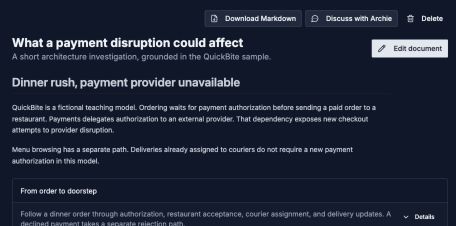
A document can mix prose and diagrams. Choose live resource references when you want readers to inspect the model.
Open image separatelySaved Artifact Blocks
The Artifacts sidebar section lets you insert saved simulations, checkpoint diffs, and analysis results alongside the existing text and resource blocks. Choose the artifact type after inserting the block, then select the result and its display options.
A simulation block can show the full proposal, architecture, a particular workflow, or impact. A checkpoint block can show an interactive before/after comparison or a change summary. Other saved artifacts include project analysis, risk review, architecture insight, blast radius, architecture drift, and what-if analysis.
Artifacts preserve the selected result. They do not refresh automatically or run a new AI analysis on insertion. See Document Artifacts for the picker, display controls, and publication behavior, or follow Build An Architecture Change Review to combine them into one page.
Reference Documents From Views
Open a View's documentation area and choose which Architecture Documents belong in that published experience. The View stores references to the canonical documents; editing the document updates every live reference to it.
This works well for material reused across audiences, such as security posture, integration conventions, operational readiness, or a domain overview.
Download One Document
Choose Download Markdown from the document to export it as a Markdown file. Supported diagrams are represented with Mermaid. Review the exported file in the tool where you intend to read it; interactive inspectors belong to the Archflow browser experience.
Versioning And Permissions
Documents are version-scoped and participate in version cloning, comparison, and merge. A read-only version can render documents but cannot author, reorder, move, or delete them.
Choosing The Right Surface
| Need | Use |
|---|---|
| Reusable narrative with embedded model evidence | Architecture Document |
| Formal project goals, constraints, decisions, quality, and risks | Architecture Handbook |
| Audience-specific visual architecture story | Architecture View documentation |
| Sources, approved memory, and reviewable insights | Project Knowledge |