Project Workspace
Navigate the model, analysis, decisions, documentation, history, and settings for a project
The project workspace keeps the active project and architecture version visible while you move from evidence to a reviewed decision.
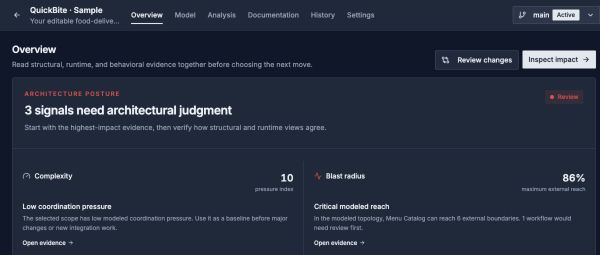
Open an attention signal to inspect its evidence. The working version is shown in the project header.
Open image separatelyNavigation
| Area | Use it for |
|---|---|
| Overview | Review the project map, inventory, and attention signals |
| Model | Maintain Systems, Relationships, Data Model, Workflows, Behavior Model, Capability Map, Deployments, Architecture Canvas, and Project imports |
| Analysis | Explore Context Map, Complexity, Blast Radius, Coupling, and the full-model Explorer |
| Documentation | Create Documents, maintain the Architecture Handbook, build Views, curate Project Knowledge, and review findings under Decisions |
| History | Manage Versions, capture Checkpoints, Review changes, and explore Architecture Simulations |
| Settings | Configure Archie automation, sharing, project MCP keys, and API access |
Read The Overview
Architecture posture brings together complexity, blast radius, coupling, and behavior signals. Open a signal's evidence before interpreting its metric. Loading or unavailable evidence is different from a model with no findings.
The Architecture fingerprint gives a compact view of project structure and its analysis lenses. Needs attention ranks review items and links to their supporting evidence. These are entry points for investigation, not a substitute for the selected lens, workflow coverage, or architectural judgment.
Use Review changes to compare the current saved model with its review checkpoint. Capture a checkpoint first when the version has no baseline.
Selected Working Version
Most project surfaces operate on the selected architecture version. Check the version selector before editing, analyzing, publishing, or discussing a model with Archie. Imported or historical content can be read-only.
Shared Workbench Pattern
Canvas-oriented pages use consistent navigation, selection, zoom, save-state, read/edit mode, and inspector patterns. The available tools differ because a View, Workflow, Deployment, Architecture Canvas, and Explorer have different purposes.
A Practical Review Flow
- Confirm the selected version and intended scope.
- Model static structure and relevant runtime behavior.
- Inspect analysis evidence at the context, module, or leaf level.
- Review resulting items under Documentation → Decisions.
- Capture accepted conclusions in Documents, the Handbook, or Project Knowledge.
- Create a version or publish selected evidence when the review is complete.