Archflow
Features

Complexity Analysis

Analyze architectural complexity using the Kauffman NK model and coupling matrix

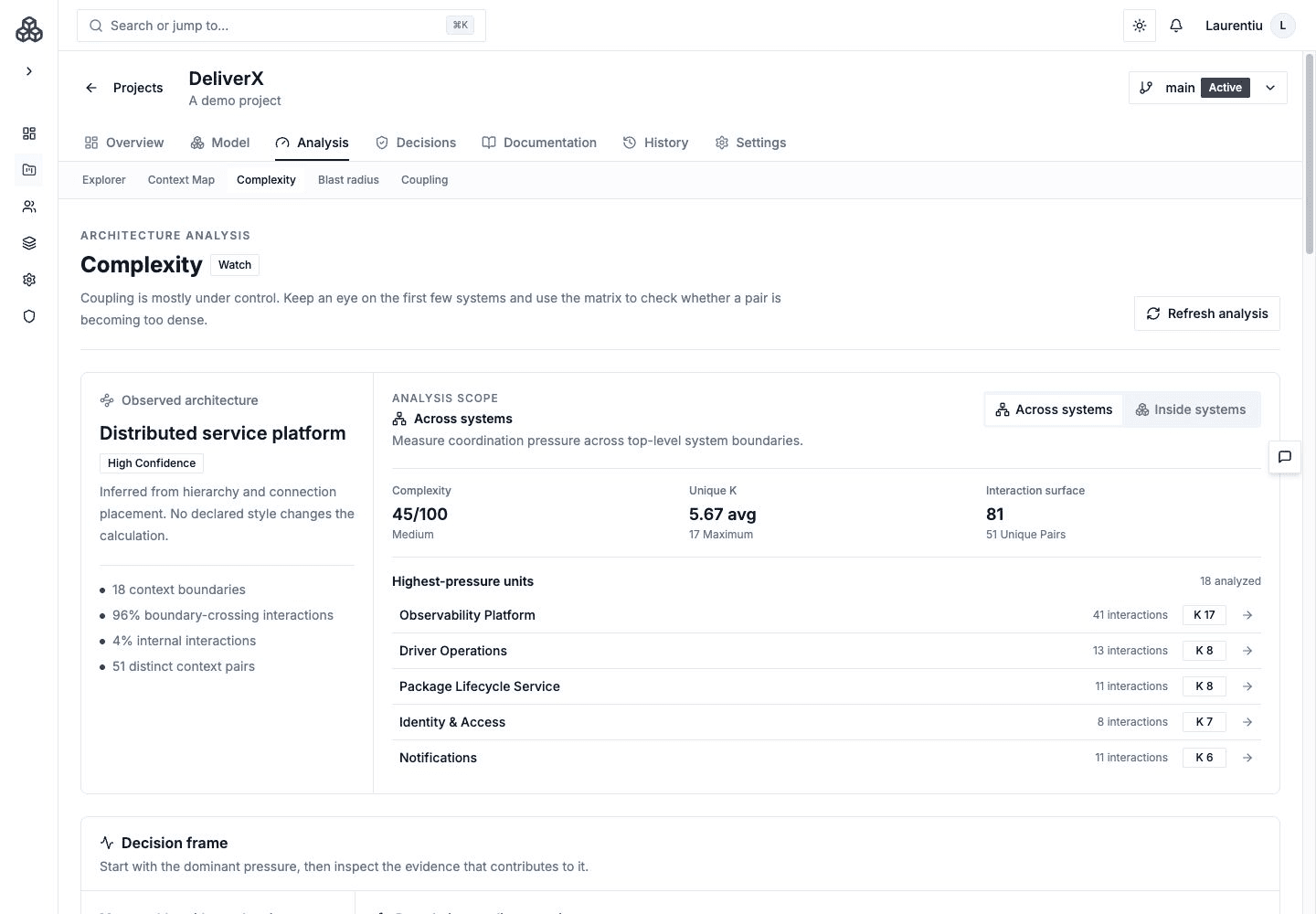
The Complexity Analysis page helps you understand and measure the complexity of your software architecture using the Kauffman NK model --- a formal framework for analyzing system coupling and interdependencies.

Accessing Complexity Analysis

From your project navigation, click ArchitectureComplexity to open the Complexity Analysis page.

NK Model Analysis

Archflow uses the Kauffman NK model to analyze architectural coupling. In this model:

  • N represents the number of systems in your architecture
  • K represents the average number of dependencies per system

Higher K values indicate tighter coupling, which increases complexity and makes the architecture harder to change.

Coupling Matrix

The coupling matrix is a visual grid showing system-to-system dependencies:

  • Each cell represents the coupling strength between two systems
  • Color-coded from low (green) to high (red) coupling
  • Diagonal represents self-coupling (internal complexity)
  • Helps identify clusters of tightly coupled systems

System Coupling Analysis

For each system, the analysis provides:

  • Coupling score --- Overall coupling metric based on connections
  • Fan-in --- Number of systems that depend on this system
  • Fan-out --- Number of systems this system depends on
  • Coupling type --- Afferent (incoming), efferent (outgoing), or balanced

High-Coupled Systems

The analysis automatically identifies systems with unusually high coupling:

  • Systems with far more connections than average
  • Hub systems that many others depend on
  • Systems with both high fan-in and fan-out (potential bottlenecks)

Complexity Metrics

The analysis also evaluates your architecture across traditional dimensions:

Connection Complexity

  • Total connections between systems
  • Average connections per system --- helps identify over-coupled or under-connected systems
  • Connection density --- ratio of actual connections to possible connections

Hierarchy Depth

  • Nesting levels --- how deep your system hierarchy goes
  • Child count distribution --- how many children each parent system has
  • Balance assessment --- whether the hierarchy is evenly distributed

System Distribution

  • Systems by type --- breakdown of Persons, Software Systems, Containers, and Components
  • Systems per level --- distribution across hierarchy levels

Interpreting Results

Well-Structured Architecture

A well-structured architecture typically shows:

  • Moderate connection density (not too sparse, not too dense)
  • Balanced hierarchy with consistent nesting depth
  • Clear separation between different system types
  • Low to moderate K values in the NK model

Warning Signs

Watch for these indicators of architectural issues:

  • Hub systems --- Systems with far more connections than average may be doing too much
  • Isolated systems --- Systems with zero connections may be missing relationships
  • Deep nesting --- Excessive hierarchy depth may indicate over-decomposition
  • High coupling clusters --- Groups of tightly coupled systems that should be refactored

Using Complexity Analysis

Regular Reviews

Run complexity analysis periodically to track how your architecture evolves. Increasing complexity over time may indicate architectural drift.

Before Refactoring

Use the coupling matrix and NK model metrics to identify the areas of your architecture that would benefit most from refactoring.

Documentation Support

Complexity insights help Archie and the AI documentation system produce more targeted recommendations and documentation.

Next Steps

On this page