Architecture Handbook
Maintain the structured, durable architecture story for a project
The Architecture Handbook organizes formal project guidance without duplicating model-owned structure. Open it under Documentation → Handbook.
Older projects, links, or integrations may still use the name “Arc42 Workspace.” The current product name is Architecture Handbook.
Handbook Chapters
| Chapter | Capture |
|---|---|
| Purpose & Goals | Business goals, stakeholders, and architectural outcomes |
| Constraints | Technical, organizational, regulatory, and operational boundaries |
| Scope & Context | The system boundary and important external context |
| Solution Strategy | The major approaches chosen to meet the goals |
| Decisions | Architecture decision records and their rationale |
| Quality Requirements | Quality goals and concrete scenarios |
| Risks & Technical Debt | Known exposure, mitigation, and intentional debt |
Systems, relationships, workflows, deployment topology, and data structure remain in their canonical Model surfaces. The Handbook explains why those structures exist and what governs their evolution.
Connect An Entry To Its Evidence
Open an entry to read or edit it. Use the visible type filters and search to find the kind of guidance you need.
- Attach Architecture elements to identify the Systems or other elements governed by the entry.
- Add Linked entries with a relationship such as related, mitigates, satisfies, or constrained by. The available target types depend on the relationship.
- Use Referenced by to follow backlinks from other entries.
- For a superseded ADR, select its replacement under Superseded by.
For example, connect a payment-availability risk to the decision that mitigates it and attach Payments as the affected architecture element. Readers can then follow the reasoning instead of searching for disconnected text.
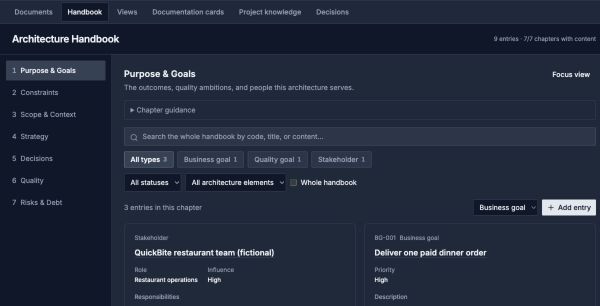
The Handbook records why the model is shaped this way. Open an entry to follow its linked guidance and architecture evidence.
Open image separatelyFrom Review To Handbook
Analysis and Decisions can surface concerns, risks, technical debt, and decision suggestions. Review the evidence before promoting a durable conclusion into the appropriate Handbook chapter.
Use:
- Architecture Documents for reusable, free-form narratives
- Project Knowledge for source evidence, approved memories, and reviewed insights
- Architecture Handbook for formal project guidance and decisions
Imported root projects can expose a read-only Handbook when their content is owned by the source project.