Data Model
Define logical data ownership, structure, usage, constraints, and relationships
The Data Model connects logical information to the architecture elements that own and use it. Open Model → Data Model.
Version And Mode
The Data Model belongs to the selected architecture version. Select a version before opening it, and switch from Read to Edit mode before making changes. Historical, imported, or permission-restricted versions remain read-only.
Workbench
In Read mode, select an Architecture scope, inspect the relationship graph, and expand an entity in the details catalog to read its attributes, ownership, usage, and relationships.
Switch to Edit for the authoring workbench. Use its scope and catalog controls to find entities, then create or edit their supporting evidence in the inspector.
Logical Entities
For each entity, capture:
- A human-readable name and logical kind
- Its canonical architecture owner
- Attributes and logical data types
- Constraints such as identity, uniqueness, validation, or reference rules
- Architecture elements that read, write, produce, consume, or otherwise use the entity
- Relationships and cardinality to other entities
Ownership answers “where is this information authoritative?” Usage answers “which parts of the architecture depend on it?” Keep those two concepts distinct.
Scope And Architecture Context
Selecting a System, Container, Component, or Block scopes the catalog to data owned or used by that element and its relevant descendants. Data Model context also appears on architecture element and relationship detail pages, helping reviewers connect structural dependencies to information flow.
Inspect Usage Without Losing Context
Expand an entity in model detail panels to inspect its attributes, constraints, relationships, and architecture usages inline. This makes it possible to read the data shape without opening a separate editor for every item.
Workflow usage identifies the workflows and exact transitions carrying an entity, with links back to the relevant connection. A Relationship's shared contract provides the types inherited by its linked transitions; this is separate from the entity's canonical owner and architecture reader/writer mappings.
See Shared Data Contracts to edit a contract and understand its impact across workflows.
Read The Graph At Two Levels
Use Entities to inspect individual entities and relationships. Choose Aggregate roots to fold composed entities into their root and read the relationships between aggregates. This changes the graph presentation; it does not create new owners or merge the underlying entities.
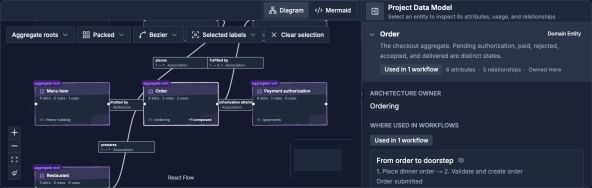
Use the catalog to inspect an entity, then use the graph to understand its relationships.
Open image separatelyFor example, inspect an Order and its composed data together before deciding which external entities relate to that aggregate. Return to Entities to inspect individual relationships; expand an entity for its attributes.
Review Questions
- Does every important entity have one clear canonical owner?
- Are readers and writers represented as usages rather than duplicate owners?
- Do relationship cardinalities match the intended domain rules?
- Are sensitive or business-critical constraints explicit?
- Would a proposed system change affect ownership, usage, or integrity?
Documentation, Decisions, And History
The Data Model can be included in published documentation and embedded as a live resource in Architecture Documents. What-if decisions can cite verified Data Model evidence. Version comparison and merge workflows include Data Model changes.
Archie and MCP can inspect the model and propose or apply supported changes according to their approval and access mode. Review the exact owner, stable IDs, and current version before accepting automated edits.