Decisions
Review architecture findings, risks, debt, suggestions, and what-if ideas
Open Documentation → Decisions. Decisions is the review queue for AI-assisted findings. Each item includes its evidence, affected architecture elements, proposed action, and lifecycle state.
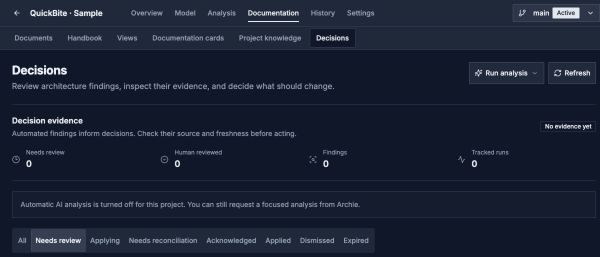
Decisions lives under Documentation. This sample has automatic analysis turned off; review the status before expecting new findings.
Open image separatelyDecision Types
| Type | Purpose |
|---|---|
| Card assignment | Suggest an Architecture Card for an element, relationship, or workflow |
| Card removal | Remove a card that no longer fits the evidence |
| Documentation gap | Identify missing or thin documentation |
| Architecture concern | Surface a structural or operational concern |
| Pattern identified | Record a recognizable architectural pattern |
| NFR risk | Flag a quality-attribute risk |
| What-if idea | Propose a forward-looking improvement, optionally grounded in Data Model evidence |
| Risk finding | Promote a reviewed risk into the Architecture Handbook |
| Technical-debt finding | Promote reviewed debt into the Handbook |
| Decision suggestion | Create a proposed ADR for formal team review |
Lifecycle
| State | Meaning |
|---|---|
| Needs review | Waiting for a person to evaluate it |
| Applying | The approved side effects are in progress |
| Needs reconciliation | Application was interrupted and must be resumed or reconciled |
| Acknowledged | An advisory finding was accepted without a model mutation |
| Applied | The approved change completed |
| Dismissed | The finding was rejected with optional feedback |
| Expired | The review window ended before action |
Review Workflow
- Confirm the selected project version.
- Filter by state, type, severity, affected elements, or confidence.
- Read the reasoning and cited project evidence.
- Discuss ambiguous tradeoffs with Archie.
- Apply an actionable item, acknowledge an advisory item, or dismiss weak evidence.
- Resume safely when an item needs reconciliation rather than creating a duplicate change.
- Promote durable conclusions into the Handbook or Project Knowledge.
Approving a risk, technical-debt item, or decision suggestion does not make the suggestion unquestionable. It creates structured Handbook material that the team should continue to govern.
When Automatic Findings Pause
The page explains why automatic work is paused:
| Message | What to do |
|---|---|
| Open findings have reached the project limit | Review pending findings or resolve unfinished applications to make room |
| Today’s project budget is used | Wait until the indicated time before expecting new automatic analysis |
| Automatic AI analysis is turned off | Check the project’s automation settings if you want it enabled |
The backlog is shared across the project's versions. A pause does not mean the architecture has no concerns. You can still request focused analysis from Archie when your AI configuration permits it. QuickBite has automatic work disabled by design.
Generation And Cost Control
Analysis is debounced and deduplicated so rapid model edits do not create a storm of equivalent findings. Project-level reviews and scheduled analysis operate on bounded project evidence. What-if ideation runs less frequently than routine per-entity analysis.