Architecture Canvas
Build and inspect the model on an canvas with manual arrangement and browser-local saving
Open Model → Architecture Canvas to explore existing elements and create missing systems or relationships. This is the modeling surface previously called Sketch; existing Sketch links still lead here.
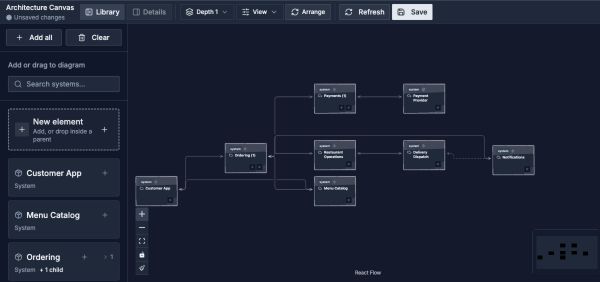
Use this canvas to explore and build. Save keeps this browser’s arrangement; a View provides a shared presentation.
Open image separatelyBuild The Canvas
- Open Library and drag existing elements onto the canvas, or choose Add all.
- Expand an element and choose which children to reveal.
- Collapse or hide elements to focus the model.
- Use Clear to remove the canvas selection without deleting architecture elements.
- Open Details to inspect a selected element's responsibilities and supporting evidence.
Drag cards to position them manually. Choose Arrange to run automatic layout again; use the layout controls for direction, expansion depth, and edge presentation. Remove from canvas hides an element from this canvas without deleting it from the model.
Save The Canvas
Choose Save to keep the visible, expanded, and hidden selection together with the canvas arrangement in this browser for the selected project and version. The save indicator distinguishes this saved selection from subsequent changes.
This browser-local canvas is not a published Architecture View or a layout shared with teammates. Use an Architecture View when the saved visual must be shared with teammates or included in documentation.
Edit The Architecture
Creating an element from the Library or drawing a Relationship changes the real model after you complete its details. Check the selected version and edit permissions first. Saving the canvas selection is separate from those model changes.
The details panel connects an element to relationships, workflow participation, documentation, behavior, capabilities, and Data Model context where available. Supported workflows can open in a drawer so you can inspect or edit the execution path without leaving the canvas.
Choose The Right Surface
| Surface | Best for |
|---|---|
| Architecture Canvas | Explore and build the canonical model with browser-local arrangement and selection |
| Explorer | Read-only orientation across the current architecture |
| Architecture View | A curated visual with saved placement for review and publication |