Build An Architecture Change Review
Combine a captured baseline, a simulation, and saved evidence in a review document
Use this workflow for a migration, service consolidation, or boundary change that needs a clear proposal and a durable record. The result is one Architecture Document that combines your reasoning with the model evidence behind it.
You need: an editable project version and saved model content. Archie simulation requires AI availability. You can still compare checkpoints and write the review manually without it.
- 01
Working version
Your editable line of architecture work.
- 02
Checkpoint A
A named capture of the saved model before a change.
- 03
Checkpoint B
Another capture after the change. Compare A and B to review it.
1. Capture The Starting Point
Select the intended project version, save editor changes, and capture a named checkpoint under History → Checkpoints. Use a separate version if implementation will require an independent line of work.
2. Explore The Proposal
Start an Architecture Simulation with Archie. State the objective, affected systems, constraints, and expected outcome. For example: “Explore moving payment orchestration into one service, preserve asynchronous confirmations, and show how the order workflow changes.”
Review Current, Proposed, and Diff across the architecture, workflows, impact, events, and data evidence that the simulation contains. Use Discuss with Archie to examine a tradeoff with the simulation attached to the conversation.
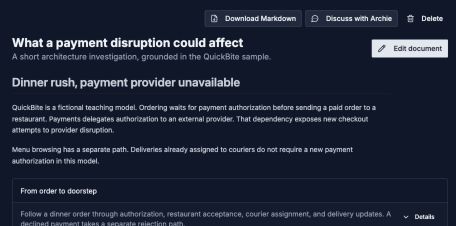
A useful document starts with the reader’s question and keeps the evidence close to the explanation.
Open image separately3. Assemble The Review Document
Choose Save to document on the simulation, or open an existing document under Documentation → Documents. In edit mode, combine blocks in an order that supports the review:
| Document section | Suggested blocks |
|---|---|
| Objective and constraints | Markdown and callouts |
| Proposed architecture | Simulation artifact: Architecture comparison, Current and proposed |
| Execution path | Simulation artifact: Specific workflow |
| Risks and affected dependencies | Saved Risk review, Blast radius, or Project analysis artifacts |
| Current supporting model | Live Data Model, Workflow, or Architecture View blocks |
| Decision and follow-up | Markdown with assumptions, owners, rollout checks, and open questions |
Insert each Artifact from the sidebar and choose its type and saved result. The analysis picker reuses results from this version's documents and your Archie conversations. It does not run new analysis just because a block was inserted.
Record the simulation revision and explain which blocks are captured results and which follow the live version. Use Update to latest only after reviewing a newer simulation revision.
4. Review Implemented Changes
After saving model changes, open History → Review changes. Read the briefing against the starting checkpoint, inspect individual resource changes, and discuss unclear consequences with Archie.
When the state is ready for a fixed review, capture a second checkpoint. Add a Checkpoint diff artifact to the document using the before/after pair. Choose Interactive comparison for detailed inspection or Change summary for a compact account.
A simulation remains a proposal until its modeled changes are materialized and reviewed. Saving it to a document does not apply it to the baseline.
Check: a reader can tell the starting state, proposal, and implemented change apart. Each artifact identifies the evidence it captures.
5. Share The Reviewed Story
Reference the Architecture Document from a View and include it in the publication's selected sections. Preview the complete reader experience, including artifact displays and any historical model detail, before sharing.
Checkpoint snapshots omit captured Architecture Documents that were not selected for publication. Still review the contents of the artifacts you include and choose access and expiration for the audience. Republishing updates the publication; later model edits do not silently change pinned evidence.